
Skip to content

We use essential cookies to sign you in and remember your settings. With your permission we also use analytics cookies to understand how the site is used. See our privacy policy or fine-tune this anytime at cookie settings.

SubjectFree lesson

Microsoft Paint environment

ClassNotes Team 2 MIN READUPDATED 12 JUN 2026

Week: Seven

Topic: Microsoft Paint environment

Objectives: At the end of the lesson, students should be able to;

1. Identify icons in the toolbox

2. Identify the colours on the colour palette.

Reference material: Learn Africa Basic Agricultural Science UBE edition for primary school pupils 6

Content:

Microsoft Paint Environment
Microsoft Paint environment

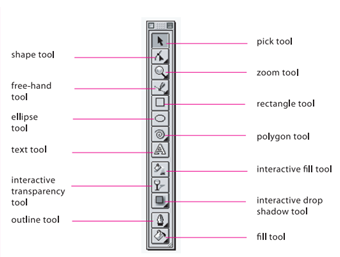
The toolbox contains the thirteen tools that are used in performing the many drawing activities of CorelDRAW. They are:

1 Pick tool: This is used in picking up other tools from the toolbox.

2 Shape tool: This is used to change the shapes of objects.

3 Zoom tool: This is used to enlarge or reduce an object or what a page looks like.

4 Freehand tool: This is used in drawing freehand lines and curves.

5 Rectangle tool: This is used in drawing rectangles.

6 Ellipse tool: This is used in drawing oval shapes and circles.

7 Polygon tool: This is used in drawing many-sided polygons.

8 Text tool: This adds text to drawings.

9 Interactive fill tool: This fills objects with colours.

10 Interactive transparency tool: This adds trans￾parency to objects.

11 Interactive drop shadow tool: This adds shadows to objects.

12 Outline tool: This adds or removes an outline from objects.

13 Fill tool: This fills objects with different things.

Evaluation:-

1. List the 13 icons in the toolbox

2. State the uses of each