
Retrieve and edit the saved document
Week: One
Topic: Revision
Week: Two
Topic: Retrieve and edit the saved document
Objectives: At the end of the lesson, students should be able to;
1. Retrieve saved document
2. Edit and save a document
Reference material: Learn Africa Basic Agricultural Science UBE edition for primary school pupils 6
Content:
Opening an old file
Sometimes, one may need to work on documents that are stored or saved in the computer system.
Such documents would usually have a name given to the file. To bring out the file to the screen of the computer system:
1 Click, File on the menu bar; a sub-menu appears.
2 Click, Open on the sub-menu, and a list of all the files in the Microsoft Word package shows on the screen.
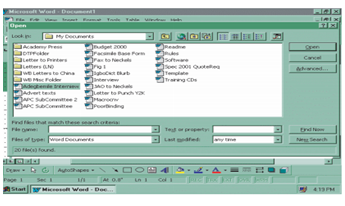
3. Search for the file needed and click.
4. The file then comes on screen, and the necessary work on the file can be done.
Saving an old document
To save an old document:
1 Click the File menu.
2 Select Save.
Evaluation:-
1. List the steps involved in retrieving saved files on a system.
2. How do you save an old document?